

Reviving a 1989 Game with Claude Code
I’ve been sitting on the source code for an old multiplayer game called Griljor for a long time. I started it with the help of my friends in 1989, as a real-time action game for Sun workstations running X11. We developed and play tested it over the next 2-3 years. It’s a simple game by today’s standards: players run around in 20×20 tile rooms, pick up weapons, and throw grenades at each other. It was a lot of fun to play with friends, late at night, in the “web” at U.C. Berkeley.
It is also, as of today, quite unrunnable. The binary format, the hardcoded /net/rootbeer/... paths from the old lab, the X11 dependency, and the Sun-specific compiler flags all conspire to make sure that no one will play it again on the original stack.
So I’ve worked with Claude Code to rewrite Griljor as a browser game. My goal from the beginning has been to make Claude write ALL of the new code, to see if it’s possible (spoiler: it is!)
This is the first in what I expect to be a small series of posts about that effort. In this one I want to talk about the planning conversation and the first three implementation phases — the asset pipeline, a static renderer, and the multiplayer server scaffold. Future posts will cover combat, inventory, monsters, the lobby, deployment, and all the surprises along the way.
The planning conversation
Before any code, I spent a session with Claude Code just talking through what a port would even look like. I pointed it at the legacy C source and asked it to inventory what was actually in there: rendering, packets, game loop, AI, editors and map and object data. Then we worked through three options together:
- Option A — Full clean rewrite in TypeScript on both ends, with WebSockets and Canvas 2D.
- Option B — C server plus a WebSocket bridge. Keep
grildrivermostly intact, write a bridge that translates browser WebSocket messages to the original UDP packet protocol, rewrite only the frontend. - Option C — Emscripten/WebAssembly. Compile the original C client to WASM and run it in the browser.
Option B is appealing on paper — the C server is the authority, the gameplay is preserved exactly — but the bridge is a new failure point, and the C server still needs hardcoded-path surgery and Sun-specific socket cleanup to even build on a modern Linux host. Option C sounds attractive until you remember that Emscripten does not support X11, and almost all of the display code in this codebase is X11. The “savings” of compiling C to WASM evaporate when you have to replace most of the code anyway.
So we went with Option A. It is the most work in raw lines, but the result is one language end-to-end, hostable anywhere, and easy to extend. Claude Code wrote up a planning document that sketched the architecture, listed the hard parts, and proposed a phased approach. That document still lives in the repo as docs/modern-rewrite-plan.md, and Claude and I have been updating it as we go.
A few decisions came out of that session that have shaped everything since:
- Server-authoritative game state. The original was peer-ish — players broadcast their own position, the shooter tells the victim “you died.” A new web port will give the server an opportunity to be the single source of truth for cheat resistance and clean failure modes.
- JSON over WebSockets, with shared TypeScript types. No more MessagePack, no custom binary protocol. JSON offers perfectly adequate performance for a game running at half-second-per-move pacing.
- No persistence. The original had a
.passwd-style binary file with player profiles and a custom GUI editor (editpass) for it. None of that is interesting today. Every game starts fresh at level 1. We won’t need player accounts or logins at all this way. - Editors deferred. The original ships with a full X11 map editor (
editmap) and object editor (obtor). Porting them is a future stretch goal, not part of getting the game playable. There are plenty of good objects and maps already built from the original era, and re-using them will help preserve the original feel of the game.
Phase 1 — The asset pipeline
The first real coding step was an asset pipeline. The original game used C #includes for the raw 1-bit bitmap files, bring them directly into the the C source. There were almost 200 of them, just packed bits in XBM byte-reversed order. The map files and object files were similarly packed binary structs, written straight to disk by the original C executables run on Sun workstations, with natural alignment and big-endian byte order.
Claude Code wrote three Python scripts to convert these assets:
xbm_to_png.pyreads each raw bitmap, reverses the bit order within each byte, and writes an 8-bit grayscale PNG. Stdlib only —structandzlib. No Pillow, no ImageMagick. I asked Claude to keep it dependency-free and it obliged.parse_objs.pyparses the seven.objbinary files into JSON. Each object record encodes a name, flags (permeable,transparent,masked,exit,takeable, etc.), bitmap filenames, and combat stats. Output: 1,447 object definitions across the seven object sets, plus 2,501 extracted bitmap PNGs.parse_maps.pyparses the 26.mapfiles into JSON. This one was harder than expected because there are two on-disk map formats — a v1.0 raw-struct format used by 25 of the maps, and a v2.0 “diag” tagged-field format used bystandard.map. Claude figured this out by reading the legacy C parsers, not by guessing. Output: 197 rooms across 26 JSON files.
This was the moment I started to really trust the pairing. The bitmap conversion in particular has a bunch of gotchas — XBM bit ordering, byte-reversed packing, the convention that white means “background” — and Claude handled all of it correctly the first time after reading the relevant .h files in the legacy source. The rest of the pipeline followed the same pattern: read the C, write the Python equivalent, sanity-check the output by counting records and bitmaps.
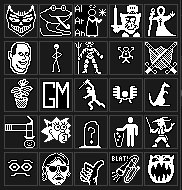
I loved looking at the PNG files at this point, because they instantly reminded of the game and the feel of it, I hadn’t laid eyes on these little 32×32 faces in 35 years!
Two things from this phase that are worth flagging because they will keep mattering later:
- Object IDs are not universal. Each map has an
objfilenamefield in its header that names the object set its tile IDs reference. The same integer means a completely different object indefault.objversusstandard.obj. Any script that walks tile data has to load the matching object file. This is going to bite us at least three more times in later phases. - Mask files are paired with bitmap files. Most object sprites have a separate mask PNG that defines which pixels are part of the sprite and which are background. The pipeline preserves both. The renderer later has to apply them correctly, which I will talk about in a moment.
Phase 2 — A static renderer in the browser
Once the pipeline was working, the next phase was getting one map onto the screen. Vite plus TypeScript, Canvas 2D, no framework. I asked Claude to keep runtime dependencies to zero — the only node_modules I want in the client are build tooling.
The structure ended up tiny:
assets.ts— loads PNGs, applies the dark/light color transform, caches the results.renderer.ts— Canvas 2D tile rendering, with floor / wall / recorded-objects layered in that order.game.ts— player position, movement, collision, exit teleportation.main.ts— entry point, dropdown menus for map and avatar selection.
A few details that are worth preserving:
The pre-render trick. The room background is static once you are in it — floors, walls, recorded objects. So we draw all of it once to an OffscreenCanvas on room entry and then per-frame composite is just two draw calls: blit the pre-rendered background, then draw the player avatar on top. Movement renders essentially instantly. Claude suggested this without me asking (and Claude brought this up while we were making this post, so I think it wants to show off).
The mask inversion bug. This is the kind of bug that only shows up when an LLM is moving fast. The first version of the bitmap loader passed mask files through the same color-transform pipeline as the regular bitmaps — white-to-transparent, dark-pixel inversion. That inverted the mask logic and made all masked sprites disappear. The fix was a one-liner: load mask files raw, no color transform. But I want to note: I caught this by playing the result. The unit tests passed. The renderer ran. The sprites were just invisible. There is no substitute for running the game and testing after each important phase.
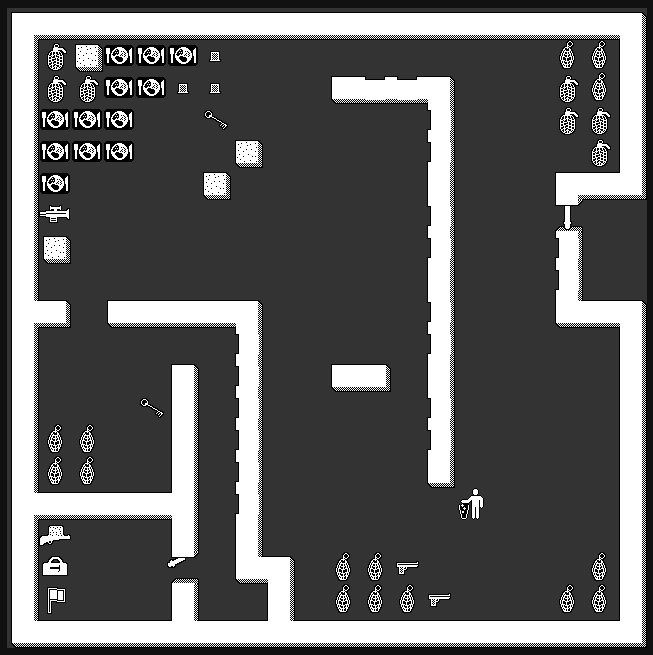
By the end of Phase 2, I could:
- Load any of the 26 maps from a dropdown.
- Pick any of the 25 player avatars from another dropdown.
- Walk around with the arrow keys.
- Step on stairs and teleport between rooms.
All single-player. All in the browser. No server yet.
Phase 3 — Server scaffold and WebSockets
The third phase brought the network in. A Node.js server using ws and TypeScript, on port 3001. Three small files:
protocol.ts— typed JSON message definitions for both directions. Because client and server are both TypeScript, this file is effectively the protocol contract, imported from both sides.world.ts— loads the same map JSON the client loads, just to know how many rooms exist.session.ts— aGameSessionthat tracks connected players and dispatchesJOIN/LOCATION/LEAVE/MESSAGEevents.
On the client, a GameNetwork class wraps the WebSocket. The game module gained an otherPlayers map and started broadcasting MY_LOCATION after every move. The renderer learned to draw remote players in the same room behind the local avatar. If the server is unreachable, the client silently falls back to single-player mode, which is great for quick local tinkering.
The first time I opened two browser tabs and saw both avatars walking around the same map in real time was the moment I started believing this was actually going to work. It was less than three days into the project. Claude had written all the code. Most of my input came in the form of feedback, during planning phases, and debugging with Claude, after testing the results.
We also added a separate lobby server on a different port, a little later in this phase. It lists running game instances so a player can pick which game to join from a title screen. That part is more of a Phase 3.5 — I will write about it in a later post that covers the title screen and the lobby UI.
Reflections on pairing with Claude Code for this
A few takeaways from these three phases that I want to remember:
Lean on the legacy code as a reference, not a translation source. The original Griljor codebase is about 35,000 lines of C, but a lot of that is X11 boilerplate. The actual game logic — movement, combat, and map rendering — is structured and commented. I kept re-pointing Claude at legacy files (mapfunc.c, objects.h, play.c) and asking it to understand the specifics again, before writing a new phase for the modern equivalent.
Decide on architecture early and write it down. The planning document we produced in the first session has been well worth it. Whenever I start a new chat, I can point Claude at docs/modern-rewrite-plan.md and docs/implementation-notes.md (which I get Claude to update after each phase), and it has the context it needs to keep the rewrite coherent across sessions.
Run the thing constantly. The mask bug is the canonical example, but it has happened in smaller ways too. Tests pass, the build is green, the code looks right, and yet the experience is wrong. For UI-heavy or game-heavy work, the only real verification is to play it.
Phasing is more about commits than about engineering. The phases in modern-rewrite-plan.md are not a project-management structure for me — they are a way to keep each session’s scope tight and to give the commit history a useful narrative. “Phase 1 — asset pipeline” is one PR. “Phase 2 — static renderer” is another.
Three days in, I had a multiplayer browser version of a 37-year-old game running locally. There is a lot more to talk about — combat, inventory, the door-and-key mechanic, click-to-move with pathfinding, the lobby, and deploying to a VPS. I will get to all of it.
For now, this is the first post in the Griljor series. Try the game at griljor.com
...no deadline — an old game I wanted to revive — precisely because it gave me complete freedom to use [[Claude Code]] however I wanted. No production system...
After the [[Griljor posts]], I wanted to try Claude Code on something I'd use every day. So in August, Claude and I built a health tracker for me. It's a...
The [[first post]] covered the asset pipeline and a static renderer. The [[second post]] turned that renderer...
In the [[first post]] I wrote about how Claude Code and I rebuilt the asset pipeline, a static room renderer, and a tiny WebSocket scaffold for Griljor —...